Introduction to Speed, Distance, and Time Calculation Formulas
Using an online calculator tool built around the core physical concepts of motion, the Speed Distance Time Calculator makes it effortless to calculate any one of three variables when two are already known. Whether you need help calculating time, speed, or distance, the process relies on a single, elegant formula: d = st, meaning distance equals speed times time. To solve for each variable, the formula branches naturally — speed = distance/time using s = d/t, and time = distance/speed using t = d/s. For distance, the expression expands to both distance = speed x time and distance = rate x time, since rate and speed are conceptually similar — both represent movement as per unit time. If rate r equals speed s, then r = s = d/t, and you can apply the equivalent expression d = rt, confirming that distance equals rate times time. These relationships form the semantic backbone of every motion-related calculation, giving this tool strong alignment with a broader topical cluster that includes physics education, unit conversion, and applied mathematics.
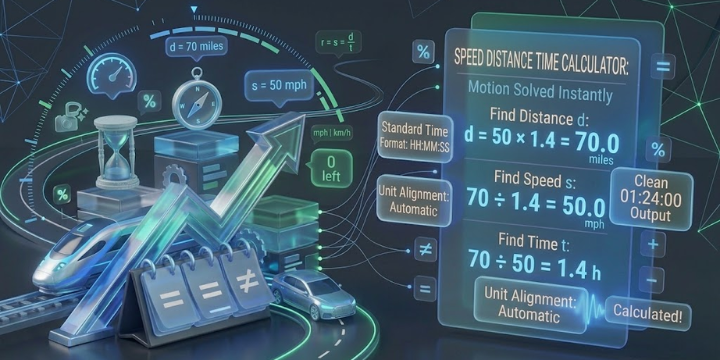
To get accurate results, enter each value along with its appropriate unit by selecting from the scroll down menu — for speed, choose from miles per hour, kilometers per hour, or other supported rates, and for length measurement, select the proper unit from the same menu. The result appears in standard time format, displayed as HH:MM:SS or hh:mm:ss, and can also be expressed in units of seconds (s), minutes (min), or hours (hr) depending on your preference. Both parameters — distance and speed — must be fully entered before the unknown sdt value is resolved. Shortcuts for time formats simplify entered inputs, especially when basing calculations on mixed time values like hours and minutes and seconds. This calculator functions as a reliable Time Calculator, and pairs naturally with tools like a Unit Converter, Proportion Calculator, or Quadratic Calculator, all found within the broader Utility Calculators Category — making it a practical, trusted resource for students, professionals, and everyday users alike.
Time Speed Distance Formula: Core Equations Explained
At the heart of every motion problem lies a clean, three-part relationship built on physics: Distance = Speed × Time. This foundational formula expresses that distance is always equal to speed multiplied by time — a principle of motion that holds true whether you’re calculating a short travel leg or a cross-country route. What makes this formula particularly powerful is how naturally it restructures itself around whichever variable is unknown. Need the rate of movement? Apply Speed = Distance / Time, where the value of speed is derived by dividing the total distance by elapsed time. Tracking how long a journey takes? Flip it to Time = Distance / Speed, and the answer follows directly. Each equation shares the same ratio, simply rearranged — a reflection of how elegantly multiplication and division govern the logic of calculation in applied physics.
Understanding Distance/Speed as a unit-dependent ratio is where practical experience adds real clarity. In everyday travel scenarios, the unit attached to each value matters just as much as the number itself — mixing kilometers with hours versus meters with seconds will skew every calculation if not handled carefully. The Speed Distance Time Calculator removes that friction by managing unit alignment automatically, letting you focus purely on the variable you need to solve. Whether you’re working with Speed = Distance / Time to find a rate, using Distance = Speed × Time to plan a route, or applying Time = Distance / Speed to estimate arrival, the underlying relationship stays consistent. This is precisely why the formula is a cornerstone across education, engineering, logistics, and navigation — its equals structure is universal, its logic unambiguous, and its practical value immediately applicable across any context involving motion.
Calculate Time from Distance and Speed Examples with Step-by-Step Solutions
Working through real examples is the clearest way to understand how the formula Time = Distance / Speed functions across different unit combinations. In Example 1, with a speed 50 miles per hour (km/h) and a distance of 70 miles, the calculation runs as: 70 km ÷ 50 km/h = 1.4 h. Since the decimal portion requires conversion, and 1 hour = 60 minutes, multiplying 0.4 h × 60 (0.4 × 60) gives 24 minutes — making the total elapsed time exactly 1 hour 24 minutes, expressed in HH:MM:SS format as 01:24:00. This straightforward case involves no mixed units, so no rounding or additional measurement adjustment is needed — the result is a clean integer hour plus a decimal-derived minute value.
Example 2 introduces the added complexity of mixed units — a rate of 40 kilometers per hour against a distance of 60 miles — which requires a unit conversion before applying 60 miles / (40 km/h). Since 1 mile = 1.609344 km, multiplying 60 × 1.609344 km yields 96.56064 km, and dividing by 40 km/h produces 2.414016 h. Breaking this down: the hours component is 2 h, then 0.414016 h × 60 (0.414016 × 60) = 24.84096 minutes, giving 24 min as the minutes integer. The remaining decimal — 0.84096 min × 60 sec (0.84096 × 60 sec) — equals 50 sec (approximately), completing the seconds value. The final result is 2 hours 24 minutes 50 seconds, formatted precisely as 02:24:50 in HH:MM:SS — a practical demonstration of how kilometers, miles, seconds, minutes, and hours interact when calculating time demands real-world measurement precision.
Time Entry Formats hh:mm:ss: Supported Inputs, Delimiters, and Entry Limits
One detail that often trips users up when working with a Speed Distance Time Calculator is how to correctly input time values — and getting the format right makes a meaningful difference in output accuracy. The calculator accepts time in a flexible structured format using the hh:mm:ss notation, where exactly 2 separators are always required. The separator characters themselves are interchangeable: a colon (:), a dash (-), or a period (.) all function as valid delimiter options. So whether you enter your time as 15:06:22, 15-06-22, or 15.06.22, all three are correctly interpreted as 15 hours, 6 minutes, and 22 seconds — identical in value, just different in notation. This flexibility in time input reflects a thoughtfully designed digital interface that prioritizes usability without compromising standard time format integrity or parsing reliability.
Beyond separator style, the calculator enforces clearly defined entry limits for each numeric component to keep every input valid and within a logical range. The allowed constraint for hours spans hours 0 to 999, supporting extended duration calculations well beyond a single day — a practical edge over basic clocktime tools. For minutes, the minimum is 0 and the maximum is minutes 0 to 59, and the same range applies to seconds, with seconds 0 to 59 marking the upper constraint. These boundaries ensure clean parsing of every HH:MM:SS value entered, preventing format errors before they affect the calculation. Understanding these formats and entry limits upfront — especially the requirement for exactly 2 separators — saves time and ensures that the standard structured format produces dependable, precise results across every speed, distance, and time scenario.