Percentage Change Calculator: How to Find the Percent Change Between Two Values
A percentage change calculator is one of those tools you don’t fully appreciate until you’re mid-spreadsheet trying to figure out whether your numbers went up or down — and by how much. At its core, it determines the percentage change between two values, making it particularly useful across finance, chemistry, physics, and mathematics. Whether you’re tracking a stock portfolio or running a classroom experiment, the ability to calculate percentage change quickly tells a story that raw numbers alone can’t. Tools like a Percentage Calculator or an Average Calculator often live in the same toolkit for exactly this reason — they work together to turn data into insight.
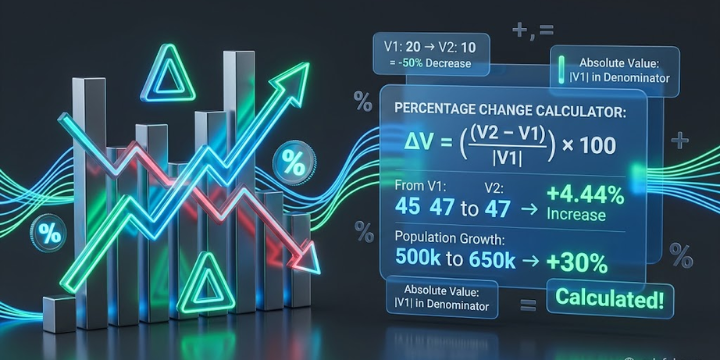
What makes the percent change calculator so practical is how it handles both directions of movement. A positive change signals an increase in percentage value; a negative change flags a decrease in percentage value. The order of your inputs matters: you supply an old value (V1) and a new value (V2), and the order in which you enter those numbers matters to the percent change calculation. Take apples: if your supply starts at 10 and rises to 20, that’s a 100% increase. Flip those starting and ending values — V1 first, V2 second — and the formula holds. Use the wrong order, and your result flips the sign. That’s a trap beginners fall into constantly, and it’s worth flagging before diving into the computation.
The Percent Change Calculator Formula Explained
The percent change calculator formula is built around the relationship between V2 and V1: take V2 minus V1, divided by V1, then multiplied by 100. Here, V1 is the original value and V2 is the changed value. Expressed more formally using the percentage change formula: ΔV = (V2 minus V1) / |V1| × 100, where V1 is the initial value and V2 is the final value. The absolute value — represented by the modulus or vertical lines surrounding the denominator — ensures you’re measuring distance from 0 rather than allowing a sign error to corrupt the result. Mathematicians define absolute value as the version of x stripped of any positive or negative minus sign: |3.5| and |-3.5| both return 3.5. When you see those vertical lines in the percent change formula, simply erase the sign and proceed.
This is where a percentage difference calculator diverges slightly — it looks at the difference between V1 and V2 symmetrically, which is why the percent difference formula uses a denominator based on the average of both values rather than just V1. For classroom and everyday applications — computing sales tax on an item, calculating a tip on a restaurant bill, negotiating a salary, or tracking a child’s height to see if it has increased appropriately — the standard percentage change equals change in value divided by the absolute value of V1, multiplied by 100. You can absolutely do this by hand, and knowing the real world mechanic builds intuition that a calculator alone won’t give you. For anything more complex — like a real-life application tracking population growth rate or running a mathematical analysis — the formula scales without modification. The Statistics Calculator and ROI Calculator categories both lean on this same underlying logic; percent change is foundational to how returns, variances, and growth metrics are framed.
Real-Life Application: Population Growth Rate and Mathematical Challenges
The real-life application that clicks fastest for most people is population growth rate. Say a city had 500,000 residents in 2010 (V1) and 650,000 by 2020 (V2). Plug those into the percent change formula — (650,000 − 500,000) / |500,000| × 100 — and you get a 30% growth over the decade. This is the kind of in-depth analysis that appears in policy documents, geography coursework, and economic forecasting. The percent change calculator is useful in everyday contexts, but it genuinely earns its place when the numbers get large and the stakes rise.
The mathematical challenges and traps for beginners tend to cluster around two areas: confusing percent change with percent difference, and misidentifying which value is V1 versus V2. A general percentage formula helps here — it describes one quantity relative to another, expressed as a ratio of two quantities after multiplying by 100. That framing applies whether you’re working through a Math Calculators Category on a reference site, punching values into a TI-84 Calculator, or building a model in a statistics tool. The underlying ratio doesn’t change. Reading this kind of content as a whole — rather than jumping to the formula and ignoring the context — is what separates someone who gets the right answer from someone who just gets an answer. After a long time working with these calculations, the situation that shows up most in mistakes is always the same: someone reversed V1 and V2 and never noticed.
How to Calculate Percentage Change: Formula, Examples, and Step-by-Step Walkthrough
To calculate percentage change, you need two numbers and one reliable formula: V2 minus V1, divided by V1, multiplied by 100. V1 is the starting point — and V2 is whatever it changed to. Consider George, who holds stock in Vandelay Industries. The stock price moved from $45 to $47 per share. Since the price increased, V1 equals 45 and V2 equals 47. Firstly, subtract: 47 minus 45 equals 2. Secondly, divide 2 by 45 to get 0.044. Finally, multiply 0.044 by 100 — rounding to 4.44 — giving you 4.44 percent increase in share value. Clean, repeatable, and fast once you’ve run it a few times. A YouTube video can demonstrate this visually, but the arithmetic itself is straightforward enough to follow in text.
The same process applies regardless of direction. You take V1, identify V2, find the difference, apply the absolute value to the denominator, divide, then multiply the result by 100. Tools like the Calcful percent change calculator remove the friction of doing this by hand — but understanding the mathematical formula first means you’ll always know whether a tool is giving you a sensible answer. The next section walks through worked examples so you can observe the formula behaving across different scenarios, including negative numbers.
Example 1: Percentage Change from Decrease and Increase
Take two prices: 3.50 and 2.625. Label them V1 and V2 respectively, then plug numbers into the formula: V2 minus V1, divided by absolute value V1, multiplied by 100. That’s 2.625 minus 3.50, which gives -0.875. Divide by 3.50, and you get -0.25 — multiply by 100 and the result is -25%, confirming a 25% decrease. Now flip the scenario: going from 2.625 back to 3.50 produces a 33.3333% increase. This is the part that trips people up most — the percentage change is not symmetrical. A 25% of 3.50 decrease and a 33.3333% of 2.625 increase represent different amounts in absolute terms, even though they cover the same price gap. That asymmetry is baked into how the formula weights each direction.
It’s worth pausing here because this non-symmetry matters in real calculations — in investing, pricing, and any field where you’re obliged to remember that the denominator shifts depending on which value you treat as the origin. You are not simply running the same division twice. The absolute modulus applied via vertical lines ensures the denominator stays positive, which keeps the sign of your output clean and meaningful. A positive result means increase; a negative result means decrease. That sign is the first thing to observe before interpreting any percent change calculator output.
Example 2: Working with Negative Numbers
Negative numbers introduce one wrinkle: the absolute value of the denominator is what you divide by, not the raw signed figure. Say V1 is -25 and V2 is 25. Perform the subtraction: 25 minus minus 25 equals 50. The absolute value of the denominator -25 is 25. Divide 50 divided by 25 to get 2, then multiply by 100 for a 200% increase — a 200% increase that makes sense once you account for the sign flip. The vertical lines around the denominator aren’t decorative — they’re doing the structural work of keeping your division grounded.
A useful habit: before you perform the multiplication, predict outcome based on the direction of movement. If V2 is bigger than V1, you expect a positive result. If V2 is smaller, you expect negative. This lets you check answers quickly without re-running the full formula.
Example 3: Decrease into Negative Territory
Next, consider a drop from -25 to -50. The subtraction: -50 minus minus 25 gives -25. Divide by the absolute value of -25, which is 25: -25 divided by 25 equals -1. Multiply by 100: -100% — a 100% decrease. That result is telling you the value doubled in magnitude while remaining negative, which is exactly what happened. It’s a scenario that catches beginners off guard because both values carry a minus sign, but the formula handles it without modification.
Last, run a temperature example to reinforce the process. V1: 60. V2: 72. Subtract 60 from 72 to get 12. Take the absolute value of 60 — already a positive number, so no adjustment needed. Divide 12 by 60 to get 0.2. Multiply 0.2 by 100 to reach 20%. A positive result confirms an increase: 72 is 20% increase of 60. To check the result, use a percentage change calculator and confirm the output matches. For a second example: V1 is 50, V2 is -22. Subtraction gives a difference of -72 — you subtract V1 from V2, so -22 minus 50. The absolute value of 50 is 50; erase vertical lines and proceed to division: -72 divided by 50 equals -1.44. Multiply by 100: -144%. A negative result confirms this is a 144% decrease of 50. The final result is negative because V2 is smaller than V1 — exactly what the sign convention is designed to predict.
What Is Percentage Change — and How Does Direction Shape the Result?
Percent change moves in both directions, and understanding that distinction upfront saves a lot of confusion later. A percent increase calculator measures the rate of increase between two values — when the result is larger than V1, the calculator returns an answer in the form of an x percent increase. When V2 is less than V1, the outcome flips: you’re looking at a decrease, and x becomes a negative number — effectively a negative increase. A percent decrease calculator frames that same movement as a rate of decrease, expressing it as an x percent decrease. Both tools are doing identical math; the difference lies in how each one presents the direction of change.
What makes the percent change calculator distinct is that it yields results in both directions without you having to choose a mode first. It calculates the rate between values, then outputs either an x percent increase when V2 is larger than V1, or an x percent decrease when it’s smaller. To explain in more detail: the form of the answer — positive or negative number — is determined entirely by the comparison between V1 and V2. A positive result signals an increase rate; a negative result signals a decrease rate. The calculator output gives you the change rate and the direction simultaneously, which is precisely why it’s more versatile. By contrast, dedicated increase or decrease calculators each handle only one side. Regardless of which tool you use, the underlying logic is the same — the percent change calculator simply handles both, outputting a negative when the value falls and a positive when it rises. Think of it as a single instrument that sees movement in both directions and explains the result without requiring you to specify which way you expect things to go. Similarly, whether the difference runs from a larger value to a smaller value or the reverse, the same formula applies — only the direction of the output shifts.
How to Find Percentage Change Between Negative Numbers
Percentage change involving negative numbers follows the same structure as any other percent change — the tricky part is handling signs correctly at each step. Take -10 as V1 and -25 as V2: -25 reduced by -10 through subtracting V1 from V2 gives -15 as the numerator. Now compute the absolute value of V1: since -10 is negative, erase the minus to get the positive value 10 as your denominator. Divide -15 by 10 — that’s your last step before scaling — to reach -1.5. Then multiply -1.5 by 100 for a final outcome of -150%. Written as a full equation: -25 minus -10, divided by absolute value -10, multiplied by 100 — or more compactly, -15 divided by -10 becoming -1.5 times 100. Use the Calcful percentage change calculator to check your result and confirm it matches.
Here’s where a common obvious mistake occurs. If you forgot to replace -10 with its absolute value 10 in the denominator, you’d run -15 divided by -10 and land on 1.5 — a positive number — producing a final answer of 150% increase. That directly contradicts the reality of the situation: -25 smaller than -10 means the value clearly fell, not rose. One wrong place in the equation — leaving a minus sign where the modulus should erase it — flips the result entirely. This is the kind of small mistake that creates an enormous error downstream, particularly in mathematical problems that chain one calculation into another place. When solving problems with negative inputs, watch out for mathematical traps that target this exact step.
Methods and Practice: -20 and -30
To concentrate on this and reinforce the methods described above, work through one more: -20 as V1, -30 as V2. Subtract V1 from V2: -30 minus -20 equals -10 as your numerator. Apply absolute value to the denominator -20 — erase the minus, positive number 20. Division: -10 divided by 20 gives -0.5. Multiplication: -0.5 by 100 produces the outcome -50% — a decrease, confirmed by the negative sign. Run it through a percent change calculator as a check after finishing each step.
There’s no fear required when solving problems with negative numbers — the methods are consistent. What’s required is care at every point in the task: verify the absolute modulus is applied to the denominator, confirm you’re subtracting in the right order, and always predict the direction before creating your final result. Traps for beginners in mathematical calculation almost always live in one place: the denominator, where a lingering negative number quietly inverts everything. The methods above — subtraction, absolute value, division, multiplication — stay constant. Careful execution at each stage is what keeps a small input error from becoming an enormous output one.
Population Growth Rate Formula: How to Measure and Interpret Change Over Time
Population growth tracks the increase in the number of individuals within a population — and that population can be anything: people, cows, foxes, flies, or any other species whose members occupy a defined territory. It applies whether you’re studying a country, the whole world, dogs in a neighborhood, or simply determining how many individuals share an area surrounding your home. The method is consistent regardless of species: count the population at a point in time, wait one year, then compare that figure against the previous period to obtain a measure of population growth. The formula sets this up cleanly: take the current population (V2), subtract the previous population (V1), divide by V1, and multiply by 100. That’s the population growth formula in its complete working form.
The result tells you the rate of change in a single number. A population growth rate higher than zero means the population is increasing and getting bigger each year. A negative result — a value below zero — confirms the population is decreasing and becoming smaller. A population growth of 0 means population size is not changing: births and deaths, or arrivals and departures, are perfectly balanced. Mathematically, the combined whole formula reads: V2 minus V1, divided by V1, multiplied by 100. Unlike raw percentage change, which applies an absolute value to the denominator, the population growth rate formula lets the sign speak — a negative result represents genuine decline, not an error to correct.
What the Population Growth Rate Measures and Why It Matters
The population growth rate is a measure of how a population has shifted compared to a previous period. Both the raw absolute difference and the rate together illustrate change in population size across two periods, but they emphasize different things. The absolute difference tells you how many individuals were increased or decreased in raw count. The rate, by contrast, tells you how fast the population has grown or declined compared to its previous state. That distinction emphasizes the dynamics of the process rather than just the magnitude. A population growth of 20 individuals reads very differently depending on context: in a small group with V1 of 10 individuals, that’s a trifold increase in size — or equivalently, the population has grown threefold. The same increase by 20 in a population of 10,000 is, mathematically, barely a signal.
Both measures together capture the full story — one tells you what happened in absolute terms, the other tells you how significant that shift was relative to where the population started. To see what this looks like in practice: imagine a group of foxes in a particular territory. After one year, their numbers expand. If the group consisted of 10 foxes (V1) and is now 30 (V2), the trifold growth rate is immediately obvious. But if the population becomes smaller — after one year the count has declined — a negative result flags that contraction just as clearly. Notice how similar the process is to standard percentage change calculation; however, the population growth rate never applies absolute value to the numerator, because the sign is telling you something essential about dynamics. Whether you’re working with cows, flies, people, members of any species, or even dogs in a defined area, the formula remains constant — what changes is the story the rate reveals about that particular territory, country, neighborhood, or corner of the whole world.
How to Compute Population Growth Rate: A Step-by-Step Example
To compute the population growth rate, walk through a concrete example using real figures. To find the population growth rate between 1990 (V1) and 2010 (V2) in the United States: the number of citizens rose from 253,339,000 to 310,384,000 over those two decades. Calculate the population growth by first subtracting V1 from V2: 310,384,000 minus 253,339,000 gives 57,045,000. That’s the raw growth figure — the difference between the two periods. Next, divide that population growth by V1: 57,045,000 divided by 253,339,000 equals 0.225. Finally, multiply the acquired value by 100 to express it as a percent: 0.225 times 100 equals 22.5%. The US population increased by 22.5% between 1990 and 2010. Working through these steps together confirms the formula behaves exactly as expected across real-world country-level data.
Congratulations — those calculations are fully reproducible by hand, and running them manually at least once builds the kind of number sense that makes every result more meaningful going forward. That said, a percentage change calculator like the one from Calcful Calculator is always waiting for situations where speed matters or the arithmetic gets unwieldy. Keep both approaches in your toolkit.
Applying the Formula to Investment Comparisons
There’s yet another practical context where this same rate logic pays off directly: when you’re in a situation where you have spare money to invest and need to choose between options. Investment offers vary — sometimes significantly — in their interest rates and projected returns. Comparing percent changes across different investment options is one of the clearest ways to identify the most optimal path. The same formula you used to track citizens across earlier and later periods works just as cleanly when you’re comparing interest rates between two investment vehicles: subtract V1 from V2, divide by V1, multiply by 100, and the percent change tells you which option has grown faster relative to where it started.
Always keep in mind that the acquired value you produce is only as reliable as the inputs you start with — whether those inputs are population individuals in a country or projected returns on competing investment offers. When you perform these calculations, the last thing you want is to compare figures from mismatched periods or confuse which value belongs to V1. Used correctly, the rate of change formula gives you a clean, consistent basis for comparing across time — whether the subject is how a number of individuals rose or how two options stack up when you’re deciding where to invest spare money. The math is the same; what changes is the story it helps you tell.
Frequently Asked Questions About Percentage Change Calculations
Is Percentage Difference the Same as Percentage Change?
These are two different notions that often get conflated, and the distinction matters more than most people realize. Percentage change is a relative, directional measure — it depends on a fixed point of reference, specifically V1 serving as the starting value. The result is signed, meaning it can be positive or negative depending on the direction of movement. Percentage difference, by contrast, is contextual to comparison rather than sequence — it uses the average of the numbers in question as its reference, making it always positive and unsigned, carrying no direction. In practical terms, percentage change tells you how a value moved and which way, while percentage difference simply captures the magnitude of separation between two values without implying any directionality. Understanding this distinction helps you choose the right mathematical concept for the right situation.
What Is the Percentage Change from 5 to 20?
Working through the formula is straightforward once you have your reference point locked in. The calculation begins with 20 minus 5, which gives you a difference of 15. That result is then divided by 5 — V1 — giving you a ratio of 3. Multiplied by 100, the final result is 300 percent, confirming this as a 300% increase. It’s a positive change, and the numeric values here make the growth feel dramatic, but the arithmetic is clean. Some people have claimed the answer should be lower because they divide by 20 instead of 5, but that confuses the reference point — in percentage change, division always goes back to V1, not V2.
What Is the Percentage Change from 20 to 10?
Here the formula works in the negative direction. The calculation runs as 10 minus 20, which equals negative 10. That figure divided by 20 — V1 — corresponds to negative 0.5. Multiplied by 100, this gives you minus 50 percent, confirming a 50% decrease. The signed value here is meaningful: the negative change tells you there was a reduction, a clear decline from the starting number. Some sources have claimed this result as simply a “halving,” but framing it through the percentage change formula keeps the arithmetic honest and the negative direction explicit. The ratio holds regardless of how dramatic the decline appears.
What Is the Percentage Change from 2 to 3?
This one is a clean, illustrative example of modest growth. Starting with 3 minus 2, you get 1. Divided by 2 — V1 — that equals 0.5. Multiplied by 100, the result is 50 percent, making this a 50% increase. It’s a positive change moving in a positive direction, and the numeric values are simple enough that you can verify the ratio almost mentally. Some have claimed this feels like a smaller gain because the absolute difference is just 1, but percentage change is relative by design — it’s the proportion of growth against where you started that defines the calculation, not the raw arithmetic gap between the two values.
What Is the Percentage Change from 5 to 4?
A small numeric shift, but the formula still produces a meaningful signed value. The calculation runs as 4 minus 5, equaling negative 1. Divided by 5 — V1 — that equals negative 0.2. Multiplied by 100, the result is minus 20 percent — confirming a 20% decrease. The negative direction here corresponds to a clear reduction, a decline of one unit that the ratio converts into a precise, signed figure. Some have claimed this kind of minor drop isn’t worth calculating formally, but the formula doesn’t change based on scale — the arithmetic and the negative change it reveals are just as valid here as in any larger example.